• Outlook User
  • New Outlook app
  • Outlook.com
  • Outlook Mac
  • Outlook & iCloud
  • Developer
  • Microsoft 365 Admin
    • Common Problems
    • Microsoft 365
    • Outlook BCM
    • Utilities & Addins

Add an Alias to an Outlook.com Account

Slipstick Systems

› Outlook.com › Add an Alias to an Outlook.com Account

Last reviewed on June 21, 2018     12 Comments

Applies to: Outlook.com

I use Microsoft Outlook for my email through a Comcast.net address, which is set up as a Microsoft Account so I can sync my desktop and Samsung Android Outlook calendars and contacts. How do I add this account to Outlook now that it's on the new server?

After accounts are moved to the new Outlook.com server, anyone syncing calendar and contacts using a Microsoft account created with their own email address instead of an Outlook.com address won't be able to set up their account in Outlook on the desktop as it only supports auto-account setup. If you try to use auto-account setup, it adds the email account, not the Outlook.com account.

To get around this problem, you need to add an Outlook.com alias to your account then set it as a log in account.

  1. Log into Microsoft Account.
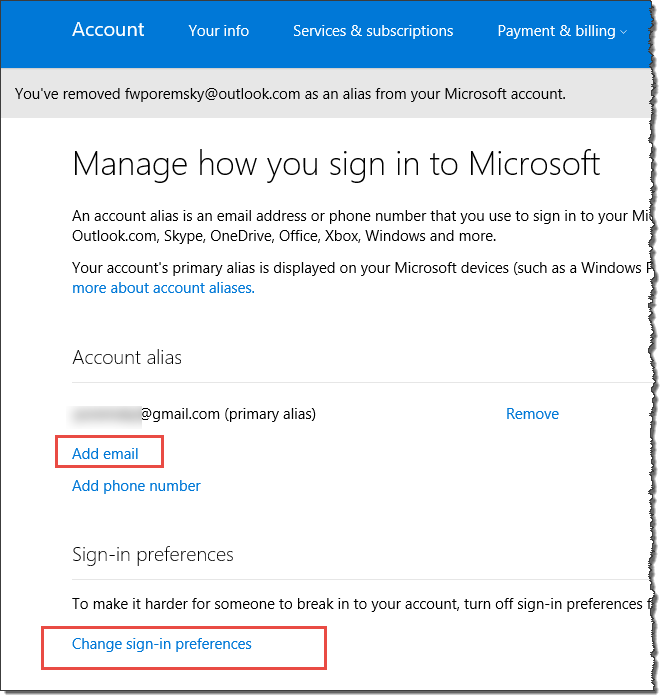
  2. Click Manage your sign-in email or phone number
  3. Click Add email.
    click add an email
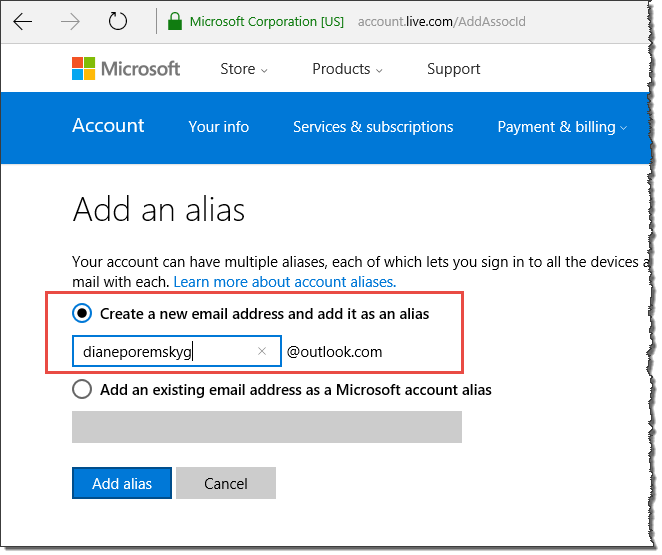
  4. Create a new Outlook.com email address. If you already have an Outlook.com address listed skip to the next step to verify it can be used to log in.
    create a new alias
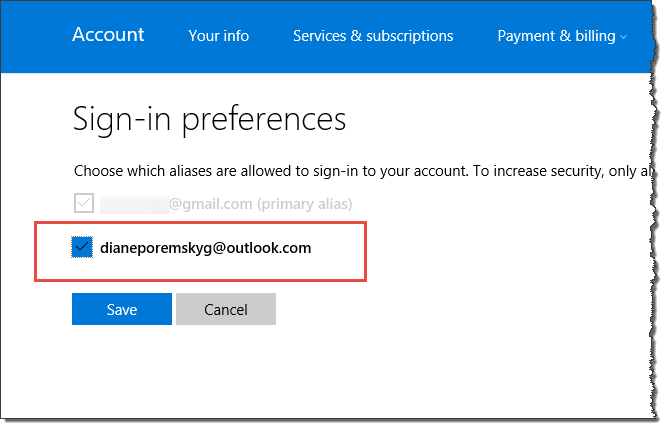
  5. Click Change sign in preferences and verify the new alias is selected so that it can be used to sign in.
    Sign in preferences in Outlook.com

Use this address to set up the account in Outlook on your desktop and devices.

You may be able to set up the account on your devices using Exchange or Outlook.com as the account type and eas.outlook.com as the server name with your non-Microsoft address, but auto account setup will work if you use the Outlook.com address.

More Information

Sync Calendar and Contacts Using Outlook.com

Add an Alias to an Outlook.com Account was last modified: June 21st, 2018 by Diane Poremsky
Post Views: 93

Related Posts:

  • Outlook.com Sync Failure
  • Syncing Outlook with an Android smartphone
  • Configure Outlook.com account on iPhone or iPad
  • Add a new Outlook.com account to Outlook

About Diane Poremsky

A Microsoft Outlook Most Valuable Professional (MVP) since 1999, Diane is the author of several books, including Outlook 2013 Absolute Beginners Book. She also created video training CDs and online training classes for Microsoft Outlook. You can find her helping people online in Outlook Forums as well as in the Microsoft Answers and TechNet forums.

Comments

  1. Albert Belo says

    November 24, 2021 at 5:37 pm

    Hi Diane,

    I've setup 2 IMAP email addresses in Outlook and got them to work in Windows and they also sync with my Android phone. The problem I'm having is with my Calendar. I can't figure out how to get it out of (This computer only) mode on the PC so it can sync with my phone. Can you help?

    Reply
  2. Gijs Withagen says

    March 14, 2020 at 12:51 pm

    Thank goodness, it took me all day to get things running. But finally, it seems to wordk

    Reply
  3. Sara says

    November 10, 2017 at 5:40 pm

    Thanks SOOOOO much for this! I was nearly in tears trying to figure this out. Now I can get my outlook.com calendar to show up on my desktop Outlook 2016 and on my phone (woot woot!). But is there any way to push info from my desktop calendar and iPhone to outlook.com?

    Reply
    • Diane Poremsky says

      November 13, 2017 at 12:37 am

      You mean to add existing items to the outlook.com calendar so they sync? You'd need to move the events in the local calendar to the outlook.com calendar folder in outlook - on the phone, you'd need to change which calendar each event is on.

      Reply
  4. Ann Romberg says

    June 2, 2017 at 11:18 am

    Will my @msn.com email account work or do I need to get a @outlook.com account too?

    Reply
    • Diane Poremsky says

      June 2, 2017 at 4:39 pm

      That is a Microsoft-owned address and counts as an outlook.com address - if you had a gmail account (Comcast, yahoo, etc), you'd need an alias.

      Reply
  5. Leon Chirino says

    February 14, 2017 at 8:55 am

    Thank you very much Diane, I have been dealing with this issue for a few days now. Vey detailed and accurate information. Thanks and God bless you!

    Reply
  6. Brian says

    February 8, 2017 at 8:31 pm

    Diane.....thank you so very much for this information. I have an old Outlook.com log in that is NOT outlook.com. I lost all my syncing between Outlook 2016 and Outlook.com (which syncs to my phone). Microsoft has great information on how to re-sync.....as long as it's an outlook.com e-mail address. I tried Auto sync and manual sync, and as you stated, all that synced was mail...no contacts or calendar. You explanation and fix for this problem worked like a charm. I wish Microsoft used this information. Again...Thank you!!

    Reply
  7. Maximilian says

    November 7, 2016 at 5:08 am

    Thank you for your Manual! Is ist possible to send emails from outlook with your non-microsoft email-adress having outlook configured as Exchange Connection, not as EAS connection?

    Reply
    • Diane Poremsky says

      November 8, 2016 at 1:29 pm

      You can, if you type the address in the from field - but you need the address set up as a connected account and its sent on behalf of the outlook.com account.

      Reply
    • Victor Ivanidze says

      January 28, 2017 at 8:50 am

      If you want to get rid of "send on behalf of" problem it looks the only solution is to set an additional IMAP account.
      MS suggests the same here. https://support.office.com/en-us/article/Sending-an-email-from-an-Outlook-com-connected-account-Outlook-sends-the-email-as-On-behalf-of-your-Outlook-com-account-6f7e17ac-cd24-401d-a3a0-ed35cf731621

      BR

      Reply
      • Diane Poremsky says

        January 30, 2017 at 4:57 pm

        If it is a non-microsoft address, you need to add the account to Outlook as pop or imap so you have the smtp server to use.

        (Outlook.com addresses can be sent from outlook 2016 by selecting the address on the from dropdown.)

Leave a Reply Cancel reply

Your email address will not be published. Required fields are marked *

Visit Slipstick Forums.
What's New at Slipstick.com

Latest EMO: Vol. 31 Issue 5

Subscribe to Exchange Messaging Outlook


Support Services

Do you need help setting up Outlook, moving your email to a new computer, migrating or configuring Office 365, or just need some one-on-one assistance?

Our Sponsors

CompanionLink
ReliefJet
  • Popular
  • Latest
  • Week Month All
  • Jetpack plugin with Stats module needs to be enabled.
  • Sync Issues and Errors with Gmail and Yahoo accounts
  • Error Opening iCloud Appointments in Classic Outlook
  • Opt out of Microsoft 365 Companion Apps
  • Mail Templates in Outlook for Windows (and Web)
  • Urban legend: Microsoft Deletes Old Outlook.com Messages
  • Buttons in the New Message Notifications
  • Move Deleted Items to Another Folder Automatically
  • Open Outlook Templates using PowerShell
  • Count and List Folders in Classic Outlook
  • Google Workspace and Outlook with POP Mail
Ajax spinner

Recent Bugs List

Microsoft keeps a running list of issues affecting recently released updates at Fixes or workarounds for recent issues in classic Outlook (Windows).

For new Outlook for Windows: Fixes or workarounds for recent issues in new Outlook for Windows .

Outlook for Mac Recent issues: Fixes or workarounds for recent issues in Outlook for Mac

Outlook.com Recent issues: Fixes or workarounds for recent issues on Outlook.com

Office Update History

Update history for supported Office versions is at Update history for Office

Outlook Suggestions and Feedback

Outlook Feedback covers Outlook as an email client, including Outlook Android, iOS, Mac, and Windows clients, as well as the browser extension (PWA) and Outlook on the web.

Outlook (new) Feedback. Use this for feedback and suggestions for Outlook (new).

Use Outlook.com Feedback for suggestions or feedback about Outlook.com accounts.

Other Microsoft 365 applications and services


New Outlook Articles

Sync Issues and Errors with Gmail and Yahoo accounts

Error Opening iCloud Appointments in Classic Outlook

Opt out of Microsoft 365 Companion Apps

Mail Templates in Outlook for Windows (and Web)

Urban legend: Microsoft Deletes Old Outlook.com Messages

Buttons in the New Message Notifications

Move Deleted Items to Another Folder Automatically

Open Outlook Templates using PowerShell

Count and List Folders in Classic Outlook

Google Workspace and Outlook with POP Mail

Newest Code Samples

Open Outlook Templates using PowerShell

Count and List Folders in Classic Outlook

Insert Word Document into Email using VBA

Warn Before Deleting a Contact

Use PowerShell to Delete Attachments

Remove RE:, FWD:, and Other Prefixes from Subject Line

Change the Mailing Address Using PowerShell

Categorize @Mentioned Messages

Send an Email When You Open Outlook

Delete Old Calendar Events using VBA

Repair PST

Convert an OST to PST

Repair damaged PST file

Repair large PST File

Remove password from PST

Merge Two Data Files

Sync & Share Outlook Data

  • Share Calendar & Contacts
  • Synchronize two computers
  • Sync Calendar and Contacts Using Outlook.com
  • Sync Outlook & Android Devices
  • Sync Google Calendar with Outlook
  • Access Folders in Other Users Mailboxes

Diane Poremsky [Outlook MVP]

Make a donation

Mail Tools

Sending and Retrieval Tools

Mass Mail Tools

Compose Tools

Duplicate Remover Tools

Mail Tools for Outlook

Online Services

Calendar Tools

Schedule Management

Calendar Printing Tools

Calendar Reminder Tools

Calendar Dates & Data

Time and Billing Tools

Meeting Productivity Tools

Duplicate Remover Tools

Productivity

Productivity Tools

Automatic Message Processing Tools

Special Function Automatic Processing Tools

Housekeeping and Message Management

Task Tools

Project and Business Management Tools

Choosing the Folder to Save a Sent Message In

Run Rules on messages after reading

Help & Suggestions

Submit Outlook Feature Requests

Slipstick Support Services

Buy Microsoft 365 Office Software and Services

Visit Slipstick Forums.

What's New at Slipstick.com

Home | Outlook User | Exchange Administrator | Office 365 | Outlook.com | Outlook Developer
Outlook for Mac | Common Problems | Utilities & Addins | Tutorials
Outlook & iCloud Issues | Outlook Apps
EMO Archives | About Slipstick | Slipstick Forums
Submit New or Updated Outlook and Exchange Server Utilities

Send comments using our Feedback page
Copyright © 2026 Slipstick Systems. All rights reserved.
Slipstick Systems is not affiliated with Microsoft Corporation.